Orchestrate a team of agents with mytty-ctl
mytty-ctl is the CLI that ships with Mytty and lets an AI agent open and drive other panes. Rather than the invisible subagents a Task/Agent tool spawns, it runs a small team of subagents in panes that stay visible and interruptible on screen.
Every pane's shell environment in Mytty automatically has MYTTY_CONTROL_SOCKET, MYTTY_CTL_BIN, and MYTTY_SURFACE_ID set, so an agent can call another AI agent right away with something like "$MYTTY_CTL_BIN" agent spawn --provider codex --task "..." -- no other setup needed.
The full list of mytty-ctl commands and their JSON output shapes is in the mytty-ctl reference.
Using this
There are two ways to get an agent to read the guide.
Just mention Mytty
With "Teach agents about Mytty orchestration" on (Settings > Orchestration), mentioning Mytty anywhere in the request is enough -- the reference it writes (~/.claude/skills/mytty-panes/SKILL.md for Claude Code, a block in ~/.codex/AGENTS.md for Codex) triggers on that alone and points the agent at mytty-ctl guide:
With Mytty, split a pane and have Claude Code review this diff in parallel.
Skip mentioning it too: write the usage into CLAUDE.md or AGENTS.md
Writing the usage into this repo's own CLAUDE.md or AGENTS.md means a request doesn't even need to say "Mytty" -- a prompt like this is enough:
Split a pane and have Claude Code review this diff in parallel.
A staged example: two workers, then collect
This spawns two read-only investigation workers in parallel, waits for both, and collects what they found, using the agent commands directly:
job_a=$(mytty-ctl agent spawn --provider claude --worktree investigate-a \
  --task "Investigate why login times out under load." \
  --label investigate-a | jq -r '.job.jobID.rawValue')
job_b=$(mytty-ctl agent spawn --provider claude --worktree investigate-b \
  --task "Investigate whether the timeout is client- or server-side." \
  --label investigate-b | jq -r '.job.jobID.rawValue')
Both workers are claude, the same provider as the lead calling this, so omitting --access inherits the lead's own permission mode instead of defaulting to a fixed flag set -- this is the recommended default whenever the worker matches your own provider. Passing --access workspace-write explicitly here would be the wrong call: for a claude worker it always launches with --permission-mode acceptEdits regardless of the lead's own mode, so a lead running with broader permissions gets a worker that stops and waits on every approval prompt instead of matching it. --worktree gives each worker its own git worktree so the two don't fight over the same files.
mytty-ctl agent wait "$job_a" --until completed
mytty-ctl agent wait "$job_b" --until completed
findings_a=$(mytty-ctl agent result "$job_a" | jq -r '.content.text')
findings_b=$(mytty-ctl agent result "$job_b" | jq -r '.content.text')
Neither spawn passed --direction, so both workers land wherever balanced placement puts them -- see Balanced placement and parking finished workers below. Once a worker's findings are collected, park it instead of closing it so its pane stays around (out of the way, in the tab's done tab) in case something later needs to look back at it:
mytty-ctl agent park "$job_a"
mytty-ctl agent park "$job_b"
Two sequential waits are fine for two workers. Watching more than a couple at once, poll events in a loop instead of blocking on one wait/agent wait per pane -- one long-poll call picks up whichever worker's state changes next, on any pane:
cursor=$(mytty-ctl events | jq -r '.latestSequence')
while true; do
  response=$(mytty-ctl events --after "$cursor" --timeout 60)
  cursor=$(echo "$response" | jq -r '.latestSequence')
  echo "$response" | jq -c '.records[]'   # act on paneID/kind for whichever job changed
done
See the mytty-ctl reference for the full command list, JSON shapes, and failure codes -- this page stays a quick tour, not the reference.
If a worker instead stalls waiting on an approval prompt (common for a worker spawned with --access workspace-write, which for claude still stops for Bash approval even though it can edit files), catch that with --until attention rather than guessing from elapsed time, then answer the prompt directly:
mytty-ctl agent wait "$job_impl" --until attention
result=$(mytty-ctl agent result "$job_impl")
pane_impl=$(echo "$result" | jq -r '.job.paneID.rawValue')
# read $result's .content.text to see which prompt is showing, then answer it
mytty-ctl send-key "$pane_impl" "1"
mytty-ctl agent wait "$job_impl" --until completed
Plain text sent with agent send does not activate claude's approval dialog -- a bare keypress via send-key does. This needs the worker's provider hook integration installed; see Hooks are optional below.
Balanced placement and parking finished workers
Neither split nor agent spawn needs a --direction -- both default to auto, which picks whichever existing pane in the tab keeps the layout closest to an evenly filled grid, splitting it along its longer side. Spawning six workers one at a time with --direction auto converges on roughly a 3x2 grid instead of a 1x6 strip running off the edge of the window; pass an explicit left/right/up/down only when a worker specifically needs to sit next to --anchor itself. See Balanced placement in the reference for how the target pane and direction are chosen.
Once a worker finishes and its result has been read (agent result, or after agent wait --until completed), run agent park "$job" (or park "$pane_id" for a pane not tracked by a job) instead of agent close -- it moves the pane into a done_<tab>_<id> tab in the same window rather than deleting it outright, so the working tab only shows live workers while finished ones stay reachable if something later needs to look back at their output. The done tab is created the first time a pane is parked out of a given tab, appended at the end of the tab strip and never selected (parking never interrupts what the user is looking at), and reused for every later park from that same source tab. Only reach for agent close once a worker's pane genuinely won't be needed again. See Parking finished workers in the reference for the done tab's naming and reuse rules.
Hooks are optional
A worker's run state (running, idle, succeeded, failed, disconnected) is observable even for a provider whose hook integration was never installed in Settings -- Mytty estimates it natively from the pane's foreground process. Installing the provider's hooks raises the fidelity of that state (real lifecycle events instead of an estimate) and is required for wait --until attention/agent wait --until attention: native estimation deliberately never reports an approval or input request, so an attention wait against a provider with no hooks installed fails fast instead of blocking.
Testing a TUI app from inside a pane
A worker runs shell commands through its own tool with piped stdin/stdout, and its own pane's pty is occupied by its TUI, so a TUI app under development (anything that puts the terminal in raw mode) can't be run or driven directly from inside that same session. Open a sibling pane for it instead, which gives it a real pty:
pane=$(mytty-ctl split "$MYTTY_SURFACE_ID" right --command '<app under test>' | jq -r '.paneID')
mytty-ctl send "$pane" "<input>" --enter   # or send-key for raw keys
mytty-ctl read "$pane"                     # verify the rendered screen
mytty-ctl close-pane "$pane"               # once done
script -q /dev/null <app> also allocates a pseudo-tty, for a quick smoke run that doesn't need a full pane. This is running the program under test, not creating a sub-agent, so it doesn't conflict with the worker contract's rule against hidden/native sub-agents.
Settings screen
Everything this feature needs is gathered under Settings > Orchestration.
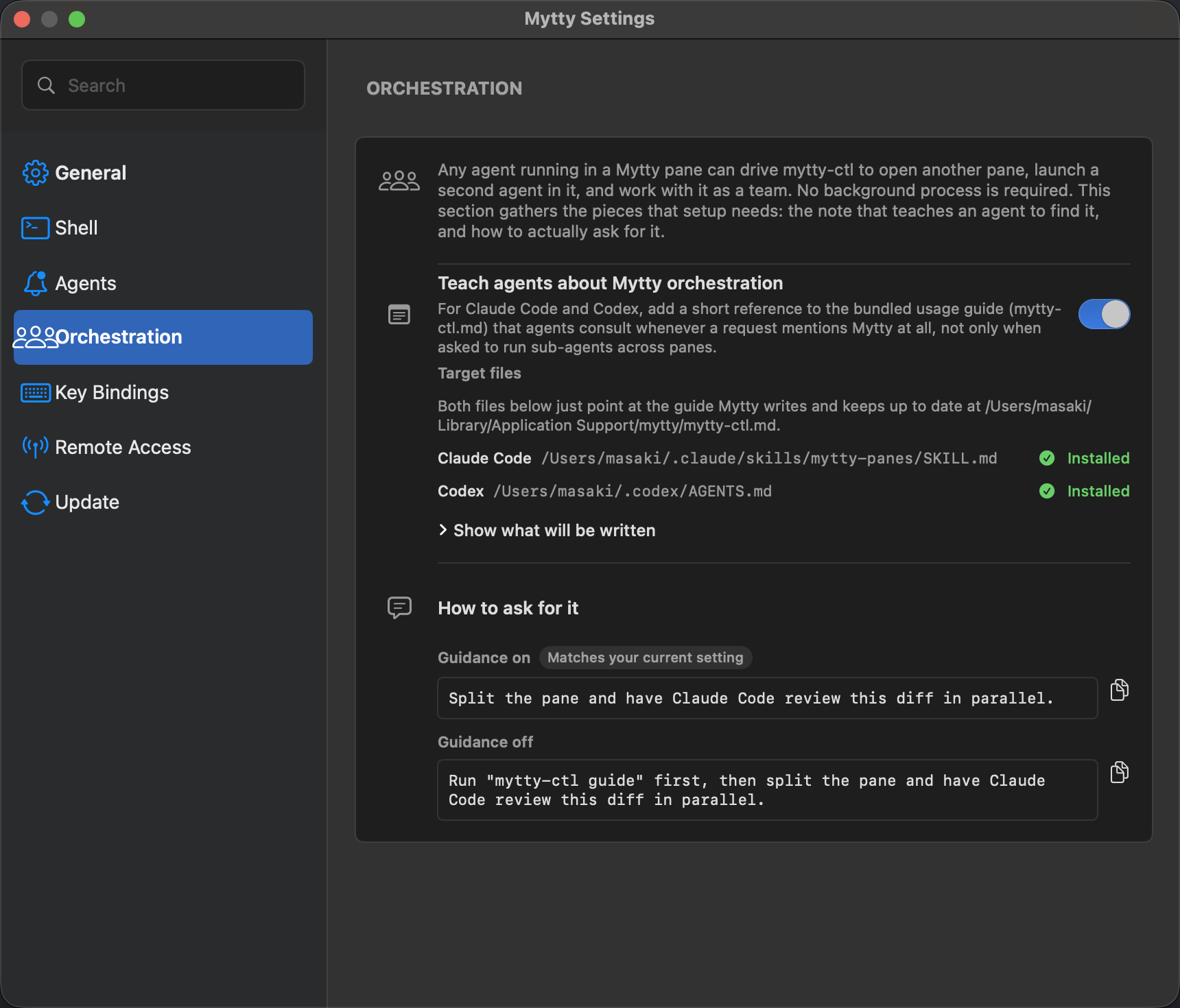
Teach agents how to use it Turning on "Teach agents about Mytty orchestration" writes a short reference into ~/.claude/skills/mytty-panes/SKILL.md and ~/.codex/AGENTS.md. The actual usage text lives in ~/Library/Application Support/mytty/mytty-ctl.md, which Mytty (re)writes on every launch to match mytty-ctl guide's output -- both references just point at that file's absolute path. So when the usage changes in a Mytty update, only the bundled guide gets rewritten; the references themselves never need to change.
"Show what will be written" reveals the exact short reference before anything is saved; opening it alone doesn't write anything.
The bottom of the same screen lists example prompts to copy from.